IPtables with K8s and Podman
I was asked in an interview to “explain the path of a packet from a client to a service running in a Kubernetes cluster”. I didn’t know the exact answer, so I fumbled through it, mostly saying how it was lookup tables all the way down - from DNS to iptables to routing table to port number to container.
Networking is now one of the university classes I wish I spent more time paying attention.
The interviewer was not impressed and I was failed promptly after. This experience has been something in the back of my mind for years, so the purpose of this blog post is to learn what actually goes on under the hood.
The interviewer was likely looking for me to know mechanisms that determine how the packet gets to the specific pod & container I want it to go to.
I aim to dive into some parts I wasn’t aware of before, so I may skip over some parts either because I want to keep the article focused or because this is enough for practical knowledge and I can dive into that rabbit hole later.
IPTable concepts
In order to understand network flow, below are facts & definitions that I would need to accept.
Chains & Netfilters, Kernel hooks
- tables = sets of rules to apply, rule-set containers in
netfilterwhich is an abstraction in the Linux Kernel that enables network operations - chains = flow of packets,
netfilterhooks into networking stack. Think of it as different stages that packets get processed at. - packets flow through chains, and rules in tables associated with those chains apply to those packets
- what chains packet flows through is based on the destination of the packet (i.e. is it for a local ip address attached to a process on this host, or for an ip address outside of this host?)
- only rules that correlate with the active chain apply to the packet
- packets can leave the server (
OUTPUT&POSTROUTINGchains), go in the server (PREROUTING&INPUTchains), or sent somewhere else (FORWARDchain)FORWARD= like forwarding an email, rules are defined for thisINPUT= localhost is destination, inbound packetsOUTPUT= localhost is source, outbound packets
Here’s a table to see what tables are executed for a chain:
| Chain | Table Processing Order |
|---|---|
| PREROUTING | Raw, CONNTRACK, Mangle, NAT |
| INPUT | Mangle, Filter, Security, NAT |
| OUTPUT | Raw, CONNTRACK, Mangle, NAT, Filter, Security |
| FORWARD | Mangle, Filter, Security |
| POSTROUTING | Mangle, NAT |
The order of chains can be rationalized that incoming packets directed for a host need to be PREROUTED before being INPUT, or packets can FORWARD/OUTPUT then get POSTROUTED.
Here’s a very good flowchart of how packets are processed:
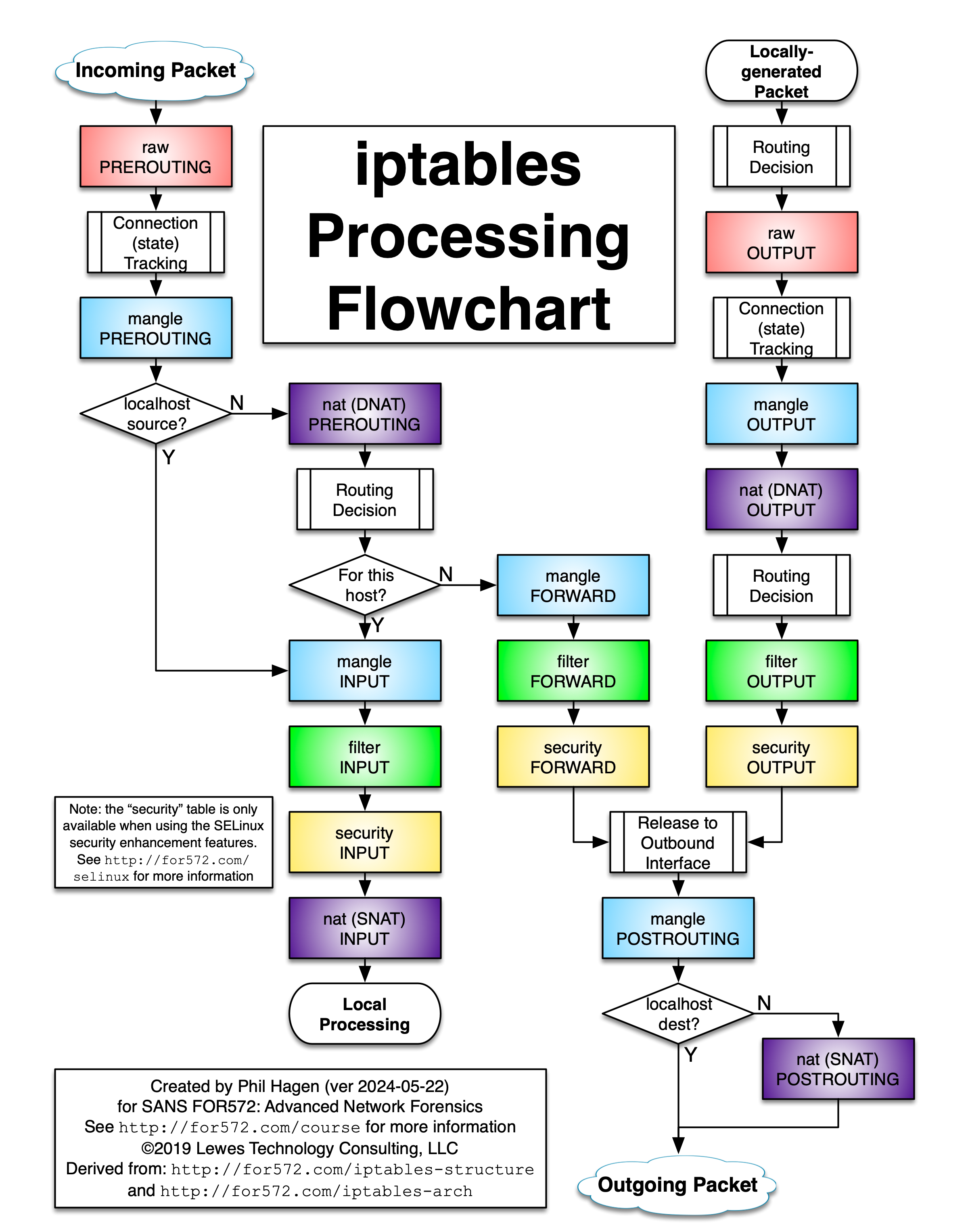
(PREROUTING, NAT) and (OUTPUT, NAT) occur before any decision is made on where packet goes to, since it may change the final IP address the packet should go to. This is Destination Network Address Translation (DNAT).
For the purposes of the interview question, we’re focused on the NAT tables.
Tables and Targets in Podman
Examining a local Podman’s container networking can provide insight in the similarities with kube-proxy’s networking.
Below is a practical flow of outgoing packets, from a host process to a container’s published port. I’ve excluded some tables & chains that I don’t think is relevant to our usecase and annotated the output with notes. 1
# -L = list
# -t = check `nat` table
# default value for `-t` is filter, so without specifying the `nat` table, you'd see the `filter` table's OUTPUT chain
# list OUTPUT chain, NAT table
$ iptables -L OUTPUT -t nat
# default policy is to accept if there are no matching chains
Chain OUTPUT (policy ACCEPT)
target     prot opt source               destination
nixos-nat-out  all  --  anywhere             anywhere
# route to this chain for any protocol, from any source and if destination is bound for local network interface
NETAVARK-HOSTPORT-DNAT  all  --  anywhere             anywhere             ADDRTYPE match dst-type LOCAL
# the last column value is part of an iptables extension for the dest-type, matches packets for any local destination

# `-n` option to show numeric ip addr & numeric port instead of names
# the `NETAVARK-HOSTPORT-DNAT` chain maps host ports to chains / containers
$ iptables -L NETAVARK-HOSTPORT-DNAT -t nat -n
Chain NETAVARK-HOSTPORT-DNAT (2 references)
target     prot opt source               destination
NETAVARK-DN-1D8721804F16F  6    --  0.0.0.0/0            0.0.0.0/0            tcp dpt:80 /* dnat name: podman id: 1e4fa9c888cedc80158dc297bf4730626761e282c64622312abf52e1d743b06e */
# port 80 is for chain NETAVARK-DN-1D8721804F16F representing the shared network for all these containers
# the subsequent chains are routing the ports to the same network as well
NETAVARK-DN-1D8721804F16F  6    --  0.0.0.0/0            0.0.0.0/0            tcp dpt:8081 /* dnat name: podman id: 4c84bfa4faf51a0517a0e966ff03855b79bb1cbf9916ff82aa04a346e54449e2 */
NETAVARK-DN-1D8721804F16F  6    --  0.0.0.0/0            0.0.0.0/0            tcp dpt:8080 /* dnat name: podman id: a5ee75e3c3e17cd126dc2091191b4dfde0827590e95f3b9a9f0966c4f7bde548 */
NETAVARK-DN-1D8721804F16F  6    --  0.0.0.0/0            0.0.0.0/0            tcp dpt:8096 /* dnat name: podman id: 3cd24ae9aa9630ab6fd3648210cd3049505a77bc54499716db8b1189afad789b */

# port 80, container id 1e4fa9
$ iptables -L NETAVARK-DN-1D8721804F16F -t nat -n
Chain NETAVARK-DN-1D8721804F16F (4 references)
target     prot opt source               destination
	NETAVARK-HOSTPORT-SETMARK  6    --  10.88.0.0/16         0.0.0.0/0            tcp dpt:80
NETAVARK-HOSTPORT-SETMARK  6    --  127.0.0.1            0.0.0.0/0            tcp dpt:80
# picking this container to trace the route
# mapping host port 80 to container port 3000
DNAT       6    --  0.0.0.0/0            0.0.0.0/0            tcp dpt:80 to:10.88.0.2:3000
NETAVARK-HOSTPORT-SETMARK  6    --  10.88.0.0/16         0.0.0.0/0            tcp dpt:8081
NETAVARK-HOSTPORT-SETMARK  6    --  127.0.0.1            0.0.0.0/0            tcp dpt:8081
DNAT       6    --  0.0.0.0/0            0.0.0.0/0            tcp dpt:8081 to:10.88.0.3:8081
NETAVARK-HOSTPORT-SETMARK  6    --  10.88.0.0/16         0.0.0.0/0            tcp dpt:8080
NETAVARK-HOSTPORT-SETMARK  6    --  127.0.0.1            0.0.0.0/0            tcp dpt:8080
DNAT       6    --  0.0.0.0/0            0.0.0.0/0            tcp dpt:8080 to:10.88.0.4:80
NETAVARK-HOSTPORT-SETMARK  6    --  10.88.0.0/16         0.0.0.0/0            tcp dpt:8096
NETAVARK-HOSTPORT-SETMARK  6    --  127.0.0.1            0.0.0.0/0            tcp dpt:8096
DNAT       6    --  0.0.0.0/0            0.0.0.0/0            tcp dpt:8096 to:10.88.0.5:8096

# finish (OUTPUT, NAT). We jump to (OUTPUT, filter)
$ iptables -L OUTPUT -t filter
Chain OUTPUT (policy ACCEPT)
target     prot opt source               destination

# at this point the packet would go to the podman0 bridge interface
$ ip route get 10.88.0.2
10.88.0.2 dev podman0 src 10.88.0.1 uid 1000
    cache
From the iptables manpage:
- targets = whether to jump to a chain, or what to do with the packet
ACCEPTtarget = let the packet throughREJECTtarget = drops connection & returns message to the senderDROPtarget = drops connection but does not send a notification- actions, not necessarily targets but to me not clear how they are represented when listing chain/tables
--jump=gotospecified chain, but return to original chain oncejumpchain finishes--goto= permanent goto, ends current chain and starts next chain thatgotospecifies
DNATtarget = rewrites destination IP address & port to its value
Podman uses bridge networks for networking, an aside
When dealing with communication that is being initiated outside the host, the outside client typically must address the laptop’s external network interface and given port number. Assuming the host allows incoming traffic, the host will know to forward the incoming traffic on that port to the specific container. To accomplish this, firewall rules are added to forward traffic when a container requests a specific port be forwarded.
Glossing over this aspect, veth interfaces are used to connect network namespaces and connect containers to a bridge.
It is my understanding that because Podman allows containers to be run rootless, it has a different networking approach than Docker.
Following the path of an outbound packet in a Kubernetes cluster
This example uses a kind cluster to have a local setup, so the networking architecture may differ from production Kubernetes. However, the general concepts should be the same, and what networking looks like depends on whether your cluster is using iptables in the first place.
Ref: https://kubernetes.io/docs/reference/networking/virtual-ips/#proxy-mode-iptables
Based on what we know from above, here’s what should happen:
- DNS lookup to get pod IP
- Get route to pod IP, which uses an outbound interface
- We run through the
iptableson the source node - Packet gets to destination node
- Packet runs through destination node’s
iptables - Packet gets routed to pod’s container
But this current understanding is missing details. Where does DNAT happen? How do we convert a service IP to pod IP?
Let’s say we’re following the path of a packet from a netshoot pod, to the nginx pod.
$ k get pods -o custom-columns=NAME:metadata.name,IP:status.podIP,HOSTIP:status.hostIP,NODE:spec.nodeName
NAME                        IP           HOSTIP      NODE
netshoot-567df8c85f-vvz28   10.244.1.2   10.89.0.6   kind-worker2
nginx-745f7dd65c-fp9qh      10.244.3.2   10.89.0.7   kind-worker

$ k get svc/nginx-service
NAME            TYPE        CLUSTER-IP      EXTERNAL-IP   PORT(S)   AGE
nginx-service   ClusterIP   10.96.65.144   <none>        80/TCP    97m
# inside netshoot pod
netshoot-567df8c85f-vvz28:~ dig +short nginx-service.default.svc.cluster.local
10.96.65.144

netshoot-567df8c85f-vvz28:~ ip route get 10.96.65.144
10.96.65.144 via 10.244.1.1 dev eth0 src 10.244.1.2 uid 0
    cache

# no iptables rules within the pod!
netshoot-567df8c85f-vvz28:~ iptables -L
Chain INPUT (policy ACCEPT)
target     prot opt source               destination

Chain FORWARD (policy ACCEPT)
target     prot opt source               destination

Chain OUTPUT (policy ACCEPT)
target     prot opt source               destination

# on the client's node (kind-worker2) where netshoot pod is running.
# since our packet is going out of the host via eth0, we're starting at the OUTPUT chain
root@kind-worker2:/ iptables -L OUTPUT -t nat
Chain OUTPUT (policy ACCEPT)
target         prot opt source     destination
KUBE-SERVICES  all  --  anywhere   anywhere     /* kubernetes service portals */

root@kind-worker2:/ iptables -L KUBE-SERVICES -t nat
Chain KUBE-SERVICES (2 references)
target                     prot opt source     destination
KUBE-SVC-ERIFXISQEP7F7OF4  tcp  --  anywhere   10.96.0.10    /* kube-system/kube-dns:dns-tcp cluster IP */ tcp dpt:domain
KUBE-SVC-JD5MR3NA4I4DYORP  tcp  --  anywhere   10.96.0.10    /* kube-system/kube-dns:metrics cluster IP */ tcp dpt:9153
# the destination in this entry is the nginx service ip that we got earlier
# for anything going towards the service's clusterIP, let's route it to this chain
KUBE-SVC-V2OKYYMBY3REGZOG  tcp  --  anywhere   10.96.65.144  /* default/nginx-service cluster IP */ tcp dpt:http
KUBE-SVC-NPX46M4PTMTKRN6Y  tcp  --  anywhere   10.96.0.1     /* default/kubernetes:https cluster IP */ tcp dpt:https
KUBE-SVC-TCOU7JCQXEZGVUNU  udp  --  anywhere   10.96.0.10    /* kube-system/kube-dns:dns cluster IP */ udp dpt:domain
KUBE-NODEPORTS             all  --  anywhere   anywhere      /* kubernetes service nodeports; NOTE: this must be the last rule in this chain */ ADDRTYPE match dst-type LOCAL

root@kind-worker2:/ iptables -L KUBE-SVC-V2OKYYMBY3REGZOG -t nat
Chain KUBE-SVC-V2OKYYMBY3REGZOG (1 references)
target                     prot opt source         destination
# glossing over this, but we mark packets not in pod CIDR shared in k8s cluster w/ 0x4000. This is necessary for traffic outside of the cluster, so that the source IP is k8s node IP instead of a pod IP. The source IP gets changed via a MASQUERADE target, likely in POSTROUTING
KUBE-MARK-MASQ             tcp  -- !10.244.0.0/16  10.96.65.144  /* default/nginx-service cluster IP */ tcp dpt:http
# any tcp connections goes to this chain, since we already know it's meant for nginx service clusterIP
KUBE-SEP-2JRCJNV76FX7SIRH  all  --  anywhere       anywhere      /* default/nginx-service -> 10.244.3.2:80 */

root@kind-worker2:/ iptables -L KUBE-SEP-2JRCJNV76FX7SIRH -t nat
Chain KUBE-SEP-2JRCJNV76FX7SIRH (1 references)
target          prot opt source      destination
KUBE-MARK-MASQ  all  --  10.244.3.2  anywhere     /* default/nginx-service */
DNAT            tcp  --  anywhere    anywhere     /* default/nginx-service */ tcp to:10.244.3.2:80

root@kind-worker2:/ ip route
default via 10.89.0.1 dev eth0 proto static metric 100
10.89.0.0/24 dev eth0 proto kernel scope link src 10.89.0.6
10.244.0.0/24 via 10.89.0.5 dev eth0
10.244.1.2 dev veth86a49385 scope host
10.244.3.0/24 via 10.89.0.7 dev eth0

root@kind-worker2:/ ip route get 10.244.3.2
10.244.3.2 via 10.89.0.7 dev eth0 src 10.89.0.6 uid 0
	cache

# at this point the packet reaches the destination node
# skipping over the NAT tables output in the destination node, since it will run through the tables and not match any rules

root@kind-worker:/ ip route
default via 10.89.0.1 dev eth0 proto static metric 100
10.89.0.0/24 dev eth0 proto kernel scope link src 10.89.0.7
10.244.0.0/24 via 10.89.0.5 dev eth0
10.244.1.0/24 via 10.89.0.6 dev eth0
# the veth below is the nginx container's veth
10.244.3.2 dev veth8f9176fc scope host

# we can enter the namespace of the nginx container, targeting its PID
root@kind-worker:/ nsenter --target 734 -n
From the output above, we can deduce for traffic going to ClusterIP K8s Services, DNAT occurs on the source node. Once the packet reaches the destination node, it doesn’t match any of the rules in the KUBE-SERVICES table, so it doesn’t do any additional NAT.
Since DNAT occurs on the source node, that would only be possible if every single node in Kubernetes maintains a table of service ClusterIP to pod IP addresses. Going further, any time a Kubernetes service gets a new IP address, a new rule in each node’s iptables needs to be added. It makes sense now that kube-proxy runs as a Daemonset.
How I would answer the interview question, now
- A client would perform a DNS lookup for the ip address of the k8s service. The pod’s
/etc/resolv.confwould contain the cluster’skube-dns(or whatever dns service) to successfully query the domain’s ip address. - Now that we have the k8s service IP address, sending a packet to the k8s service IP address would run through the client node’s
iptablesto DNAT the service IP address to the destination pod’s IP & port. - How does the packet know the network path to the destination is something I need to learn more about. ARP? Layer 2 things?
- Once the packet reaches the destination node, the destination node’s routing table would route the packet accordingly to the pod’s network namespace via virtual interface, based on the packet’s destination ip address. The destination port on the packet would determine what process receives the packet.
So why is kube-proxy inefficient & not scalable? Because it uses iptables and iptables updates regenerate the entire NAT table, it is incredibly inefficient to update tables, chains, and filters as new services are added and when pods are moved around. This update has to happen on all nodes in the cluster. In addition, packets are matched against chains linearly, so DNAT cost also grows linearly with the number of services.
Now, eBPF supposedly fixes this issue, but I’ve never looked into it. From first principles, I would reason that it’s better because updates wouldn’t rebuild the entire NAT table (or whatever it uses), and separately, lookup would be O(1).
Refs
- https://datahacker.blog/industry/technology-menu/networking/iptables/iptables-and-ipchains#chains_and_tables
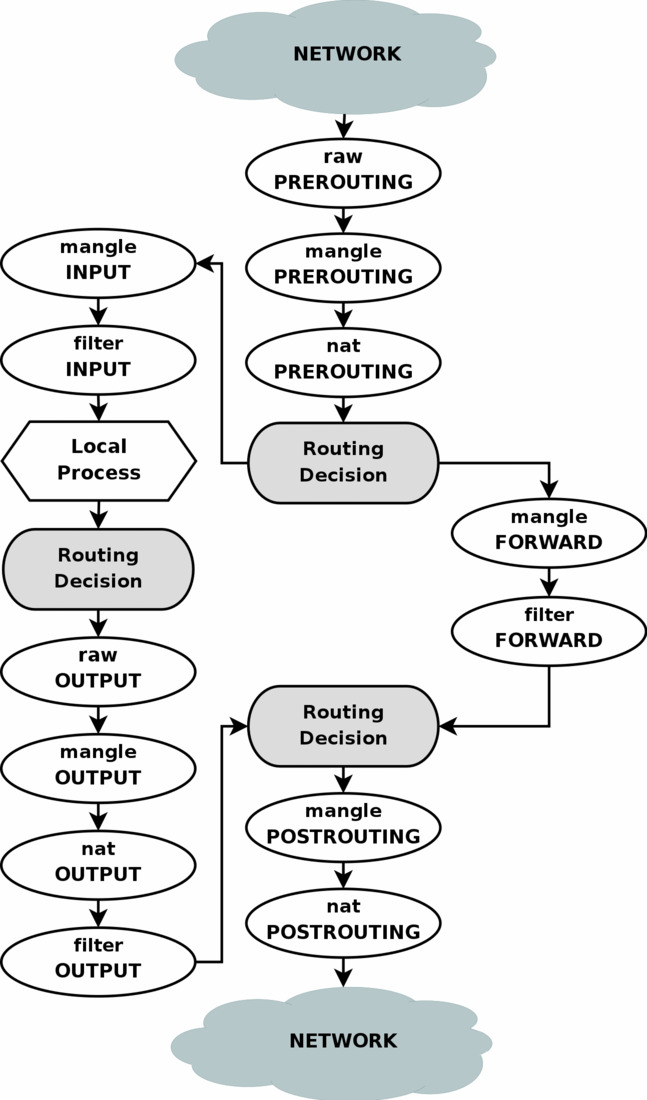
- picture showing what chain/table packet goes through
- another flowchart for chain/table packet goes through
It might be easier to visualize the iptables via
-Soption, which outputs the rules in aiptables-saveformat.↩︎$ sudo iptables -S NETAVARK-HOSTPORT-DNAT -t nat -N NETAVARK-HOSTPORT-DNAT -A NETAVARK-HOSTPORT-DNAT -p tcp -m tcp --dport 80 -m comment --comment "dnat name: podman id: 374ee16e4240594fb21206ee87a9f9e8c62d4b06e5f9ca2e040dc509b3795ba7" -j NETAVARK-DN-1D8721804F16F -A NETAVARK-HOSTPORT-DNAT -p tcp -m tcp --dport 8096 -m comment --comment "dnat name: podman id: 441929895b683f23eca570fa0afde3052eab8000d9b47f580fce779002b581e7" -j NETAVARK-DN-1D8721804F16F -A NETAVARK-HOSTPORT-DNAT -p tcp -m tcp --dport 8081 -m comment --comment "dnat name: podman id: f9f4cdeb7734261a98f8f1d2d382d24bf4d669224b09ae50e8feb05415bccda4" -j NETAVARK-DN-1D8721804F16F -A NETAVARK-HOSTPORT-DNAT -p tcp -m tcp --dport 8080 -m comment --comment "dnat name: podman id: 25f7c78f59249ccdde526e910e70dfab2a8dc73fd2c2860425f1fe2b2fd653c8" -j NETAVARK-DN-1D8721804F16F